
How to Reduce GPU Costs in Enterprise AI Systems
Cut GPU costs in enterprise AI by fixing idle utilization, right-sizing models, and taming inference: most of the bill is architecture, not hardware.

Most enterprise GPU bills are architecture problems wearing a hardware costume. Before you renegotiate cloud rates or chase a cheaper accelerator, look at what the GPUs are actually doing, and most of them are doing very little. The fastest way to reduce GPU costs in enterprise AI is to raise utilization, right-size the model to the task, and stop paying for inference capacity that sits idle between requests.
Key Highlights
- The average enterprise AI infrastructure spend hit $85,521 per month in 2025, up 36% year over year (CloudZero).
- Industry estimates suggest inference accounts for 55-80% of enterprise AI GPU spend, the cost that grows linearly with every new user.
- Many enterprise AI workloads are provisioned for peak load and run well below that level for long periods.
- Eight sequenced steps from utilization audit to FinOps discipline can materially reduce GPU spend without sacrificing performance.
- The cheapest GPU is the one you do not run.
Introduction
The average enterprise AI infrastructure spend hit $85,521 per month in 2025, up 36% year over year, according to CloudZero’s State of AI Costs report. For most enterprises, GPU compute is the single largest line item and the one most likely to grow uncontrollably as AI usage scales.
The good news is that GPU spend is highly addressable once you know where to look. The bad news is that most teams reach for the wrong lever first. They negotiate hyperscaler discounts before fixing 50% GPU idle rates. They migrate models before checking whether half the inference calls could have been cached.
This blog is a tactical playbook for CIOs, CTOs, and the AI infrastructure leaders reporting to them. We will define what is actually driving GPU cost in enterprise AI today, followed by eight concrete steps that consistently reduce spend without slowing delivery. Each step is sequenced from highest leverage to lowest, so cheap wins ship first.
Where does the money actually go?
Not into the per-hour rate: into idle capacity. The pattern we see again and again is a fleet that is reserved but empty: models sized for a peak that arrives twice a day, training clusters left warm between jobs, and inference endpoints provisioned for headroom nobody uses. A GPU billed 24/7 and busy 15% of the time is an 85% discount you never claimed.
So the first number to put on the wall is not cost per GPU-hour. It is cost per useful request, and utilization underneath it. Once you measure those, the expensive decisions become obvious. This is the same failure mode we cover in AI infrastructure mistakes that kill ROI. The meter runs on provisioning, not on value.
What Drives GPU Costs in Enterprise AI Systems?
GPU cost in enterprise AI is not a single line item. It is a stack of overlapping costs that compound as usage grows. Three drivers matter most.
Inference dominates. Training is a one-time cost. Industry estimates suggest 55-80% of enterprise AI GPU spend goes to inference, not training. Training is bounded, it runs for days or weeks and stops. Inference runs every time a user sends a request, indefinitely. As adoption grows, inference spend grows linearly with it.
Idle capacity is structural, not occasional. Many enterprise AI workloads are provisioned for peak load and run well below that level for long periods. Some workloads sit idle overnight or between batch runs. Some are dev or test instances that nobody decommissioned. The result is GPU capacity paid for but not converted into output.
Hidden costs sit outside the GPU line item itself. Egress fees, networking overhead, storage for checkpoints, MLOps engineering time, and the cost of model retraining as data drifts all sit alongside raw compute. Most AI infrastructure budgets capture the GPU hour and miss the rest.
Understanding GPU spend means understanding all three. The eight steps below address each.
How to Reduce GPU Costs in Enterprise AI Systems
8 Steps to Reduce GPU Costs in Enterprise AI Systems
Step 1: Audit your current GPU utilization before optimizing anything else
The first dollar saved is on a GPU you are already paying for. Before negotiating new contracts or migrating workloads, run a utilization audit across your existing fleet.
Most enterprises discover meaningful idle capacity once they actually look at workloads over-provisioned for peak load that rarely arrives, dev or test instances left running overnight, failed pilots that nobody decommissioned.
Pull utilization data per GPU, per project, per team. Look at three numbers: average utilization, peak utilization, and percentage of time the GPU was idle. Anything running well below typical utilization is a candidate for consolidation, downsizing, or shutdown. This step alone often eliminates a meaningful share of GPU spend before any technical change is made.
Step 2: Right-size the GPU class to the workload
Not every workload needs an H100. Running a small inference task on a top-tier GPU is the most common cost mistake in enterprise AI.
H100s and H200s are designed for training large models and serving high-throughput inference at scale. For most enterprise inference workloads, internal tools, document processing, classification, low-volume chatbots, a smaller GPU like an NVIDIA T4, L4, or A10G delivers the required performance at a fraction of the cost.
Benchmark before you choose. Profile your model’s memory footprint, compute requirements, and latency targets. If a model fits comfortably on an A10 with sub-second latency, you do not need an H100. Right-sizing typically delivers significant savings on workloads that were running on premium hardware unnecessarily.
The three levers that do most of the work here are quantization, distillation, and routing. Quantization to int8 or int4 shrinks the memory footprint so a model fits on fewer cards. Distillation trains a small model to imitate a big one on your specific traffic. And routing sends easy requests to a cheap model and only escalates the hard ones. The discipline is to right-size against the task’s real acceptance threshold, not against a benchmark leaderboard.
Step 3: Use spot or preemptible instances for fault-tolerant workloads
Spot instances offer surplus cloud GPU capacity at deep discounts often up to 60-80% off on-demand rates. The tradeoff is interruption risk: cloud providers can reclaim spot capacity with as little as two minutes’ warning.
Spot is wrong for synchronous, latency-sensitive inference. It is right for workloads that tolerate restart: model training, batch inference, async pipelines, embedding generation, evaluation runs, and overnight report generation.
The technical pattern is straightforward: build a job queue with retry logic, use checkpointing to save progress periodically, and design jobs to resume from the last checkpoint after an interruption. AWS reports that Cinnamon AI achieved roughly 70% training cost savings using AWS Managed Spot Training by following exactly this pattern.
The mistake is running everything on one procurement model. A single fleet of on-demand GPUs is the most expensive way to run a mixed workload. Match the commitment to the predictability: spiky or experimental workloads belong on on-demand or hosted APIs, where idle costs nothing; steady, predictable serving belongs on reserved capacity, where the discount for committing is real; and fault-tolerant work (training, batch scoring, offline embedding jobs) belongs on spot or preemptible instances. Split the workload by its tolerance for interruption, then buy each slice the right way.
Step 4: Quantize your models
Quantization reduces the numerical precision of model weights converting from FP32 (32-bit) to FP16, FP8, INT8, or even INT4. Lower precision means smaller memory footprint, faster inference, and more requests served per GPU hour.
The reported savings are substantial. Vendor and analyst reports cite 60-70% inference cost reductions from quantization alone, depending on the model and workload. On NVIDIA H100 GPUs, FP8 quantization roughly doubles throughput at under 2% quality loss on instruction-tuned models.
The hierarchy to test: start with FP16, move to FP8 if the hardware supports it (H100 and newer), then evaluate INT8 for further savings. INT4 is aggressive; it works for some models but degrades quality on others, so test before committing. The rule is simple: never quantize without measuring quality regression on your actual workload. Finzarc validates the accuracy drop against the task’s real acceptance bar before shipping, so you trade nothing that matters.
Step 5: Use continuous batching and PagedAttention at the inference layer
Standard inference servers process one request at a time, leaving most of the GPU idle while the next request waits. Continuous batching changes this: as soon as one token finishes generating, the GPU starts on a new request without waiting for the full sequence to complete.
The throughput gain is significant. Continuous batching with PagedAttention can significantly improve GPU utilization and throughput compared to standard inference servers, particularly at typical enterprise traffic patterns. Grouping concurrent calls lets one forward pass serve many users, lifting throughput per GPU dramatically.
Implementation is well-supported. vLLM is open source and production-ready. Red Hat’s distribution adds enterprise support if needed. For long-context workloads (32K+ tokens), KV cache quantization to INT8 or FP8 cuts memory usage by 30-50%, freeing capacity for more concurrent requests.
Two more mechanical wins live at this layer. Autoscale, including to zero. Idle endpoints should scale down between traffic, not hold cards warm for a spike that comes at 10am. And consolidate models: several small models multiplexed onto shared GPUs beats one dedicated card per model, while training and serving stay separate cost problems because training tolerates interruption and serving does not. None of this needs new hardware. It needs a serving layer that treats GPU minutes as the scarce resource they are, the discipline behind our LLMs and AI systems in production work.
Step 6: Route easy queries to smaller models
Most enterprise AI traffic does not need a frontier model. Classification tasks, simple summarization, structured extraction, internal Q&A these run well on small language models (SLMs) with 7-14 billion parameters at a fraction of the cost of GPT-4 class models.
The cost difference is large. IBM’s analysis shows Granite-class SLMs cost 3-23x less than frontier LLMs while matching or exceeding them on focused enterprise benchmarks. A large share of enterprise AI workloads, especially classification, structured extraction, summarization, and internal Q&A can often be handled by smaller models without quality loss.
Build a routing layer in front of your model stack. Classify incoming queries by complexity. Route easy queries to a fine-tuned SLM. Reserve the frontier model for the requests that genuinely need its reasoning depth. The hybrid pattern gives most enterprises the cost profile of an SLM with the quality ceiling of an LLM.
Step 7: Implement prompt and semantic caching
If your application generates the same answer twice, the second one is waste. Yet most production AI systems re-compute responses for repeated or near-identical queries every time.
Two layers of caching help. Prompt caching stores responses to exact-match queries, returning the cached result without re-running inference. Semantic caching goes further: it uses embedding similarity to recognize when a new query is meaningfully equivalent to a cached one, even if the wording differs.
The savings are workload-dependent but consistent. For high-volume assistants, customer support bots, and search features, caching can eliminate a large share of repeated calls in high-volume use cases. The trade-off is freshness cached responses do not reflect new data so design cache invalidation policies before deployment. We built exactly this economics into an organisation-wide GPT, routing, caching, and retrieval so a company could give thousands of employees an assistant without an unbounded inference bill.
Step 8: Track per-team, per-use-case GPU spend with FinOps discipline
The optimizations above only stick if someone is watching. Most enterprises track cloud costs at the account or environment level. That is not granular enough for AI workloads.
FinOps Foundation data shows only 43% of organizations track cloud costs at the unit level, and only 63% of organizations track AI spend specifically. The rest are flying blind on the fastest-growing line item in their infrastructure budget.
FinOps for AI requires three things. First, cost attribution at the model, team, and use-case level every dollar traceable to a business outcome. Second, daily cost monitoring and alerting, not quarterly reviews. Third, named cost ownership: every model, training pipeline, and inference endpoint has an owner responsible for its cost outcome. Without ownership, no one has the incentive to optimize.
Make cost per request a first-class metric with an owner, the same way you treat latency or error rate. What gets measured on a live dashboard gets managed; what lives in a monthly cloud invoice gets discovered too late. Instrument utilization and cost-per-request per model, set a budget, and alert when a deployment drifts past it.
What about the token bill on hosted LLMs?
When you don’t own the GPU, the token bill is your GPU bill, and the same logic applies. The two biggest levers are caching and context discipline. Cache responses for repeated or near-identical prompts, and you stop paying to recompute answers you already have. Trim the context: retrieval that fetches the three relevant passages costs a fraction of stuffing an entire document into every call.
Below steady, predictable volume, hosted APIs are usually cheaper because you pay nothing when idle. Above a stable utilization threshold, self-hosting on reserved or spot GPUs wins. The break-even is a spreadsheet, not an ideology. Measure your real requests-per-second before committing. Keeping that spend flat while usage climbs is the whole point of scaling LLM applications without breaking compliance or the budget.
Tips and Reminders
A few practical reminders that separate teams who actually capture savings from teams who just write a memo about it.
Sequence matters. Run cheap wins first utilization audit, caching, query routing before reaching for infrastructure migration. The cheapest GPU is the one you do not run. The wins compound in a predictable order: raise utilization first, right-size the model second, then optimize the token and caching layer.
Test every optimization for quality regression before production. Quantization, smaller models, and aggressive caching all carry quality trade-offs. The savings are real, but so is the customer impact if accuracy degrades. Build a regression test suite before optimizing.
Total cost of ownership is bigger than the GPU hour. Egress fees, networking overhead, MLOps engineering time, and storage for checkpoints all sit outside the headline GPU rate. A “cheaper” provider can be more expensive once these are counted.
The cheapest inference is the one that does not need to run. Before optimizing how a workload runs, ask whether it needs to run at all. Many AI features can be precomputed nightly, cached, or eliminated entirely with no user-visible impact.
FinOps is a habit, not a project. A one-time cost-cutting exercise saves money once. A continuous discipline saves money forever.
Conclusion
Most teams reach for the wrong lever first when GPU costs spike. They negotiate cloud discounts before auditing utilization. They migrate models before testing quantization. They buy more capacity before checking whether half the inference calls could have been cached.
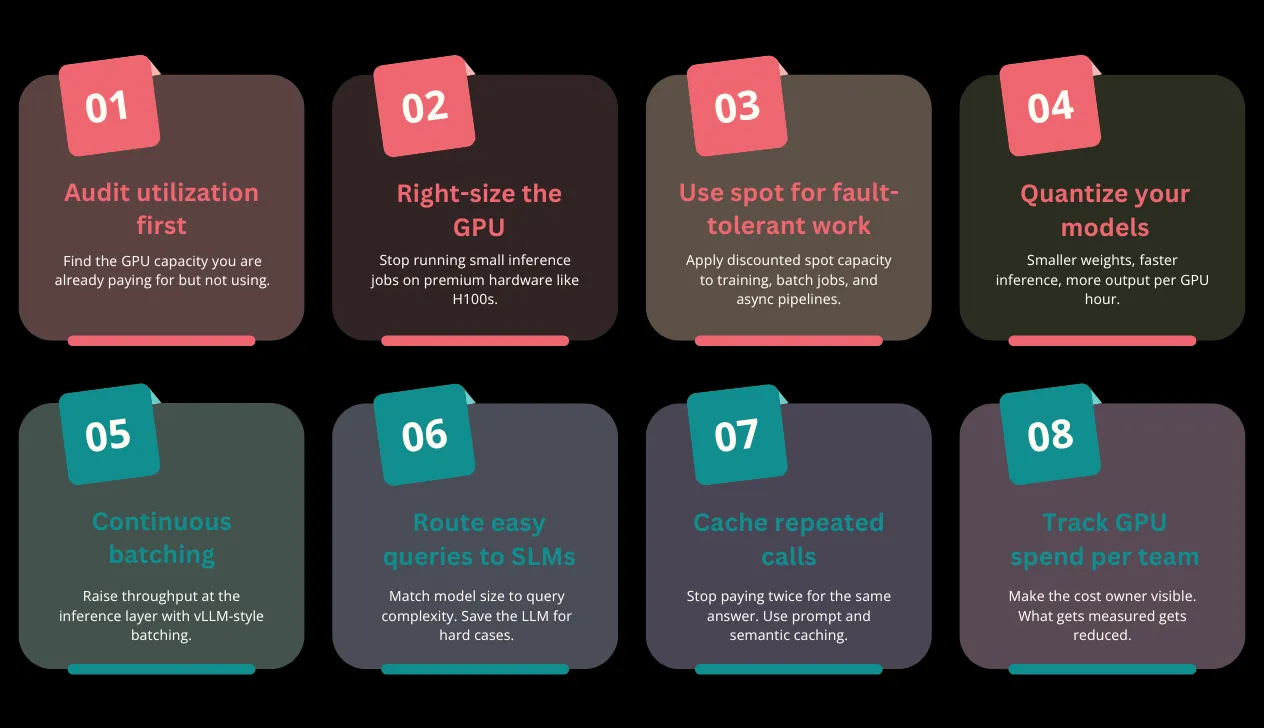
The eight steps above sequence the highest-leverage changes first: audit, right-size, use spot for fault-tolerant work, quantize, batch, route to smaller models, cache, and track per use case. Done in order, they can materially reduce enterprise AI GPU spend when applied in sequence particularly where utilization, routing, and caching gaps are obvious. Each is mostly configuration and serving architecture, not silicon. GPU cost is not a hardware price you’re stuck with, it’s a design decision you get to revisit.
The deeper point is that GPU optimization is a tactical layer. The strategic question is whether the workloads running on those GPUs are converting to business value at all. Cheaper compute on a workflow that does not move a decision is still wasted compute.
Do not just optimize how much you spend on AI. Fix how decisions move. Bring the bill. Leave with a smaller one.
Questions, answered.
What is the biggest driver of GPU cost in enterprise AI?
Idle and under-used capacity, not the per-hour rate. Most GPU fleets run reserved-but-empty or oversized for the workload, a model that fits on one card served on four, or training clusters left warm between jobs. Fix utilization before you renegotiate pricing.
Does quantization reduce model accuracy?
For most production inference, int8 or int4 quantization costs a point or two of accuracy while cutting memory and GPU hours substantially, often invisible to end users. Finzarc validates the drop against the task's real acceptance bar before shipping, so you trade nothing that matters.
Should we self-host GPUs or use a hosted LLM API?
Below steady, predictable volume, hosted APIs are usually cheaper because you pay nothing when idle. Above a stable utilization threshold, self-hosting on reserved or spot GPUs wins. The break-even is a spreadsheet, not an ideology. Measure your real requests-per-second before committing.
How quickly can GPU costs come down?
The cheap wins (batching, autoscaling to zero, right-sizing the model) usually land inside a few weeks. Finzarc ships a first delivery in about three weeks, and utilization and caching fixes are typically part of that first cut, not a later phase.
30 minutes with the founding team. Bring the problem; leave with a scope and a timeline.